Windows 7 promotions are the order of the day. Specially bad ones are the upgrade from Vista and thats making my life difficult.
A brief history, I have just convinced my wife to replace Windows Vista with Linux Mint on her Vaio. She is ok with it but has a few problems with hibernation and using her iPod Touch. Now she was upset with Vista as resource hog, so Mint was a breath of fresh air and easily accepted. However, from nowhere someone gave her a promotion code to buy Windows 7 upgrade and she did.
As windows 7 was bought without my knowlwdge, I have told her that I cannot offer tech support with it. Lets see how she does it on her own.
I'll post all my observations after 1 week of her trying and getting mad ;)
Showing posts with label Linux Mint. Show all posts
Showing posts with label Linux Mint. Show all posts
Tuesday, March 9, 2010


Thursday, February 25, 2010
From Mandriva to Mint
I have liked Mandriva since Mandrake Linux 9.1. Its been an amazing distribution ever since. Pure visual delight and ease of use. I like KDE for the look and feel, GNOME is mostly a no no for me. Mandriva being a KDE centric distro fits the bill perfectly. Mandriva is the default king of our two year old Family Desktop. We all loved the latest version and despite KDE being a little buggy, find it convenient to use.
I gave this info to emphasize that it was not easy for me to think about moving from Mandriva to any other distro, specially a GNOME centric Mint. Here goes the story :
My wife's vaio completed 1 year and ran out of official warranty. Hence she allowed me to dual boot it with Mandriva and Vista. She was already comfortable with Mandriva, so it was supposed to be a smooth move. The problem started right after the first install.
I gave this info to emphasize that it was not easy for me to think about moving from Mandriva to any other distro, specially a GNOME centric Mint. Here goes the story :
My wife's vaio completed 1 year and ran out of official warranty. Hence she allowed me to dual boot it with Mandriva and Vista. She was already comfortable with Mandriva, so it was supposed to be a smooth move. The problem started right after the first install.
- The boot was fast but DKE would come up with plenty fo Akonadi errors. We tried searching for solution, but nothing on net/forums. As this was not causing any usage error so this was low priority.
- Keyboard would hang. Yeah, while working all of a sudden keyboard would stop responding. We had to kill X-Server and restart for keyboard to be functional again. This was a big issue and evry frustrating.
- The webcam worked with r5u870 drivers, but the inbuilt mic would not agree to work. Now I am using Linux since 5 years and am fairly conversant with Mandriva. Still I could not make it work.
- Hibernation sucks. This is the first time I tried Mandriva on Laptop and I must say hibernation is great even in Vista. When I simply close the lid, the system does not go into hybernation. Though this was resolved quickly with some tips from Ubuntu forums, but it should work by default. More troubling is that comming up from hybernation is nto guranteed. Yuck !!! Strange but true. Many times even after clicking hibernate ( and not merely closing lid) the system would not resume. I would see some activity in battery and hard disk lights and some flicker on screen, but thats all. Even command line would not come up. CTRL+ ALT+ BKSP also does not work. My wife was so used to of closing the lid in Vista that she said its better to use Vista itself.
- Plasma would crash and cause the X-Server to restart. Now I have seen plasma crashes in Desktop, but restarting X-Server means loosing all the unsaved work. This was unacceptable.
I wanted to stick to Linux, but Mandriva was causing lots of issues. We started looking for more options. My first choice was Arch Linux, which I use on my main desktop, however, my wife wanted something easy to administer with all GUI controls. We went to distrowathc and started looking at distributions as per Page hit ranks. She kind of liked Ubuntu looks, but was floored by Mint screenshots. She said this amazing and she would be happy to use it. Actually despite being a GNOME Desktop Mint 8 looks evry good. Also, due to known Plasma crashes, we were ok to try GNOME.
Now Mint is a pure delight once it boots, the LIVE CD takes a huge time to boot. The looks were as impressive as in the screenshots and operation evry smooth. The webcam mic worked in the LVIE CD itself and even after 24 hours of use there was no crash/ hang. Satisfied with LIVE D test, we went ahead with the install. Here are my thoughts :
- All regular hardware works out of box. Things like Wireless, Bluetooth and USB Scanner/Printer require no config at all. Webcam worked fine with r5u870 drivers and Mic was functional with little tweaking.
- Despite being GNOME, it looks and feels like KDE and hardly any difference while working.
- Huge list of applications in repos, though I would use only a couple which are readily availble in alomst all distros. Package management is a breeze through Synaptic.
- Skype download page has a version for Ubuntu and it works perfectly with Mint.
- All media formats work out of Box. Youtube, flash, mp3 you name it and it works in Mint.
- System config is centralized. Now this is one of the best feature in Mandriva, I was relieved to finid similar one in Mint. Though I must say Mandriav is much more exhaustive and refined.
- Hibernation works with little tweaking, though I must say VISTA still outclasses it by leaps and bounds.
- Stablity. No crashes even in LIVE CD mode. Installed version looks more promissing.
- Speed. I can bet tha Mandriva is anyday faster. Right from bootup to application open time, Mandriva is much faster. However, Mint is not very slow as compared. Though I can feel the slowness, it is not a Black Mark. I will not use this on my main system, which is accustomed to speeds offered by Arch Linux.
- Look and Feel. The more you say the less it is. In its default form it just impressed us too much. Compiz bring more eye candy. The transparent Titlebar, translucent windows when dragging, the inactive windows all make you feel wow. I think the implementation is as good as Win 7.
Conclusion :
Mint is not just one of the best looking distribution I have come across, its also one of the most easier to use. 90% of things work out of box and for the remaining there is Mint and Ubuntu Forums ;). Its an eye candy, which is eaqually easy to administer and at the same time very stable. Long time KDE users like me would be at ease with Mint's GNOME implementation.
Its a distribution which I can easily give to my Windows friends to try and be assured that they will atleast use it often as a LIVE CD if not install it on hard disk. The menu and options are evry intutive to a Windows Guy and would make the transition easy. The GUI is as good looking as Win 7 and would appeal to all.
Unfortunately, this is not a perfect world. Even Mint has some issues. If the devs can improve the speed and make hibernation less painfull, Mint has all the possibilities to become the default option for Home users.
Tuesday, October 2, 2007
Ubuntu with Elegance
Linux Mint is an adaptation of Ubuntu, with packages for browser plugins, java, media codecs etc forming part of the default install. Their latest release Linux Mint Celena is compatible with Ubuntu Fiesty repositories.
Having spent some time with Linux Mint Celena, I am all praises for it. The punch line for Celena is From Freedom came elegance and I could not agree more. This is the most elegant Linux desktop I have seen. The artwork is just out of the world. You may see some screenshots here. The experience starts right from GUI GRUB menu, against the text based menu in Ubuntu, the beautiful splash screen and GDM login screen, the gnome splash and finally the Celena GNOME theme. Every thing is an eye candy but with elegance, there is no in-your-face blatant display of colors and the color scheme is well integrated. In terms of artwork Celena easily matches OSX and Vista.


Celena provides a complete desktop right from booting the Live CD. It has all the required software for Office, email, calendar, listening to songs and even watching youtube videos. Most modern distributions have very easy install procedure through the installable Live CD, Celena also follows the same and does a good job of installing to hard disk. I have described the install and my initial experiences in my previous blog entry.
Celena is Ubuntu Fiesty:
Celena has base in Ubuntu, which is considered as a benchmark in desktop Linux. Keeping this in mind I started evaluating Celan. To check the difference in default packages, lets not bash Ubuntu for not having some essential non-OSS packages like java by default.
- Celena uses Amarok for playing music, whereas Ubuntu uses Rythembox. Amarok is now becoming industry default and is more user friendly.
- Celena uses Synaptic for package management, Ubuntu uses 5(five) GUI applications for package management including Synaptic and Add/Remove Programs. I feel a single application reduces confusion.
- The Update Manager and Update Notifier were removed from Celena so users would not perform un-educated upgrades. With more than 2 releases a year and many modules affected by upgrades, stability was preferred to security in Celena. No more pop-ups telling you a new version of Ubuntu became available, no more pop-ups telling you to download the latest kernel... your system is stable, tested and it should stay that way.
- MintAssistant in Celena proves very helpful in initial system configuration.
- MintUpload allows the user to upload any file smaller than 10MB on the Internet. The user doesn't have to worry about getting an FTP client or finding Web-space to store his files. It's never been easier to share files with friends. MintUpload is also compatible with the mint-space service which allows files to be as big as 1GB.
- MintMenu looks like an adaptation of SUSE gnome menu but is much more elegant and useful. Ubuntu still uses the lackluster GNOME menu.
- Celena only has a bottom panel, a la KDE/Windows, as opposed to twin panel of Ubuntu.
- Celena uses Thunderbird instead of Evolution, which is default in Ubuntu.
- Lastly, Mint Control Center provides a more user friendly experience than the GNOME Control Center of Ubuntu.
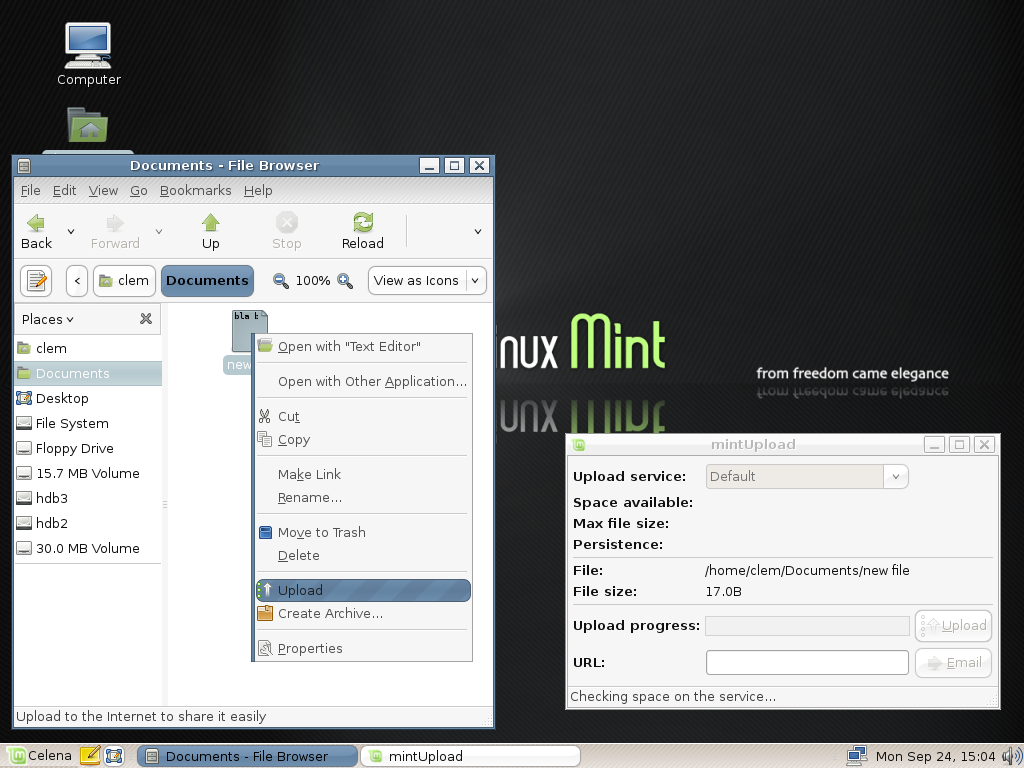
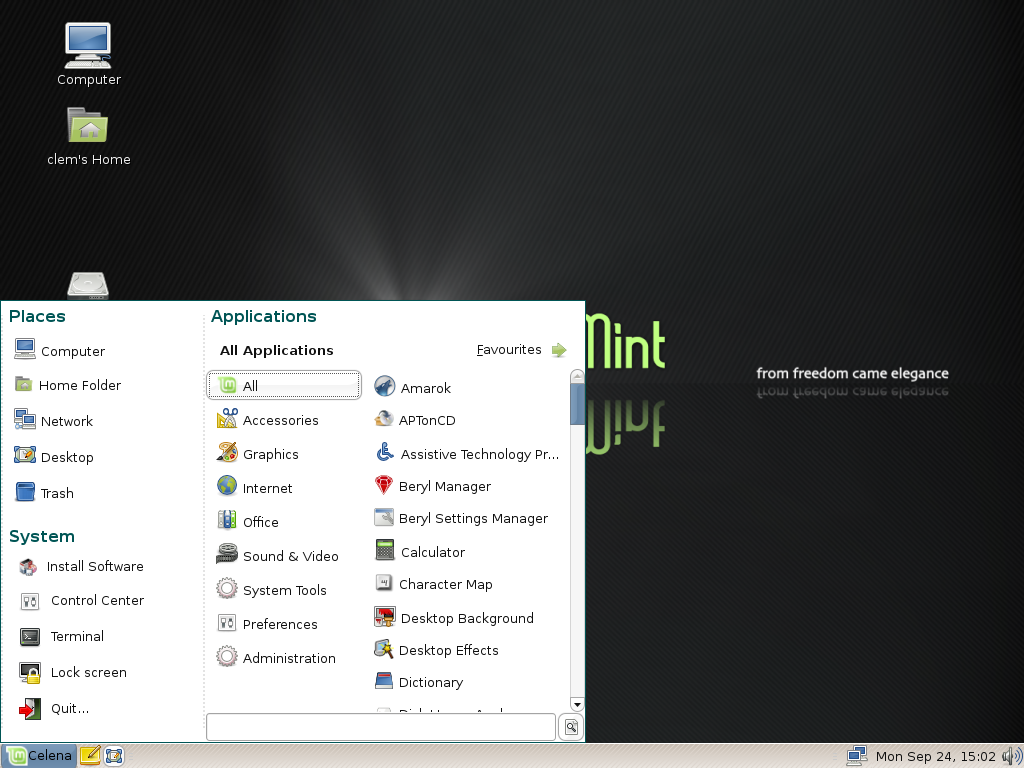
Apart from these Celena is just like Ubuntu Fiesty and provides for wholesome desktop experience.
Desktop Usage Experience :
Celena believes in Stability so it does not have the latest version of certain software like OpenOffice, GNOME and Firefox in its repositories or shall we call them Fiesty repositories. However, the installed packages perform very well. Celan applications have an amazing lead over Ubuntu when it comes to performance. Big and resource hungry applications like OpenOffice load very quickly in Celana. Here is a list of common applications I use.
- Media Player:
- Amarok for all MP3, oog songs
- Totem for playing Videos, though I prefer VLC and have installed it through Synaptic
- Photo Organizer/Editor
- Celena does not come with any Photo organizer as default, but installing Digikam, F-Spot or Picassa is easy.
- Gimp is installed by default and is the best image editor.
- Internet Utilities
- Firefox, with all plugins
- Pidgin - one of the best IM client, though I prefer Kopete.
- XChat - Its a must. All my IRC queries are through this.
- Office
- OpenOffice 2 - Do I need to say anythig ?
- Desktop Notes
- Tomboy does this job perfectly. I actually like the known yellow background in it.
- 3D Effects
- I do not have a 3D enabled video card so could not test Envy to install the proprietary driver, but from the reports I have from other blogs, Envy performs its job very well. Also Beryl is installed by default. We just need to enable beryl to have those beautiful and wobbly windows.
- Multimedia
- Out of the box almost all type of media works. I have tried mp3, avi/mpg videos and even flash videos through youtube. All work perfectly. Though there can be media types which may not play by default, for those we can follow the normal Ubuntu procedure.
- Personal Finance
- GnuCash is present, however, this is such a complicated application that it is really difficult to use for an average user. It is more suitable for small businesses. I use Buddi or KmyMoney2.
Some Issues:
The above applications pretty much make my desktop an almost complete desktop. I am using the word almost complete as still many useful applications are not installed by default also there are some stability issues. Let me list them
- Default bittorrent client is gnome-bittorrent. This is probably the most user unfriendly client I have seen. Imagine a scenario, where I am downloading the DVD of a Linux distribution. This might take more than a few hours, so I shut down my system and go to work, only to resume the download after I return home. The gnome-bittorrent will not remember where the torrent file is, so we need to download the torrent file again and tell gnome-bittorrent about its location. Oh!! miss the blissful world of ktorrent.
- Celena is for average desktop user, so it must have an easy personal finance client, GNU cash is for pro.
- No default Photo organizer and no k3b.
- I faced a strange device mounting problem. Here it goes. Suppose I have connected a USB device to my system, it will be auto mounted and an icon displayed on the desktop, now if I simply remove it and then re connect it, the device will be mounted ( I checked in terminal through mount command) but the icon will not be placed on the desktop.
- I was unable to mount VCDs, let alone playing them.
- In the default install MintMenu was crashing, I had to do a full system upgrade ( 147 MB) to resolve this. One of the major goal of celena is stability - Well I had a different out of box experience. However, apart from that I never faced any stability issue. No applications crashing, no system hang, nothing. It is stable in those terms.
- Full system upgrade lead to a dependency problem with openoffice-common, which is still not resolved. Though it does not deter any other program to install, but always gives the error. However, this can be my fault as Mint developers advice against doing upgrades. One question though - In the age of distributions like Gentoo, Arch and PCLinuxOS which have a rolling tree releases and new versions are just a snapshot of the current stable stack, does it make sense to ask the users not to do an upgrade.
Conclusion :
Whatever said and done, I think Celena is a breath of fresh air. It is the best GNOME distribution I have ever used. The artwork is simply amazing, I think PCLinuxOS must take a hint or two from Celena. Strong emphasis is given to integrating the theme with applications, as demonstrated in the Firefox screenshot. I can see the hard work Mint developers have put behind custom applications like Mint Menu, MintUpload, MintAssitant and Mint Control Center. They have done a commendable job and made our lives easy. They have not followed the trend and have included KDE applications, wherever they felt the need.
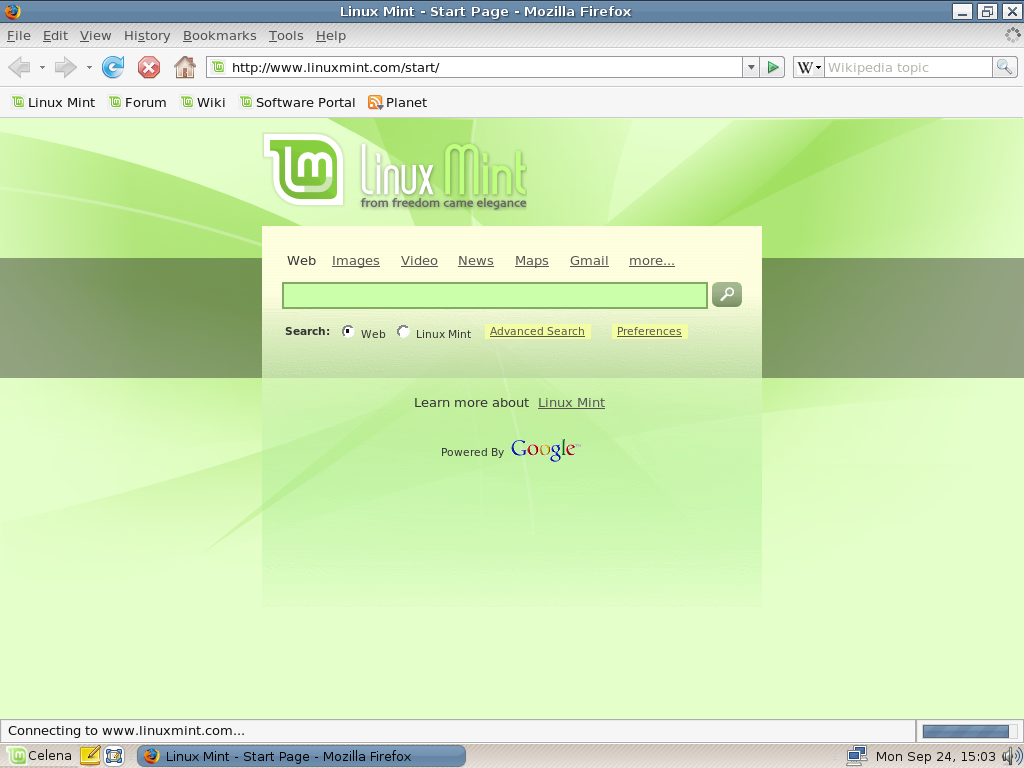
Looks like the hard work of Mint developers is paying off as Mint is steadily rising on distrowatch popularity. I am surely going to keep Celena as a Live CD and even recommend my friends to use it. For my desktop -- Sorry but SUSE 10.3 is releasing and I need space to install and my primary hard disk contains PCLinuxOS.
Wednesday, September 26, 2007
Linux Mint Celena - Initial review
Linux Mint is a user friendly variant of Ubuntu and many of its users refer to Linux Mint as "Ubuntu done right". Their website says that
"Linux Mint's purpose is to produce an elegant, up to date and comfortable GNU/Linux desktop distribution". Wow, sounds impressive. Hence when the new version of Linux Mint, Celena, was released, I could not resist the temptation and decided to try Mint on my desktop. While the Mint iso torrent was downloading, I went ahead and read some of the reviews here and here. The jest of the two reviews is that Mint is Ubuntu made simple by including browser plugins, media codecs, support for DVD playback, Java and other essential non-OSS softwares.
This article will collate my initial experiences with Linux Mint, if I like it I might keep it for some days and do a full review in future.
The download was slick and the LiveCD booted to a very impressive looking desktop. The artwork was awesome, I was simply bowled over. However, an error popped up informing me that Linux Mint Menu has quit unexpectedly. I tried reloading, but to no avail. That apart, the desktop looked very impressive and had an icon for installing Mint to hard disk. The install proceeded like normal Ubuntu install, but took a huge time to install. I utilized this time in viewing some videos from youtube, yes!! Linux mint Live CD has the capabilities to play videos from youtube.
A simple reboot brought up a Minty grub menu and thirty seconds later I saw the most elegant gnome login. One first login, Mint takes you through Mint Assistant which helped me in adding cute and funny fortunes to my terminal window.
Immediately after the login I faced my first major problem :
Problem :
Linux Mint Menu quit unexpectedly and no amount of reload, re-login or even creating and adding to new panel would help. Now without a menu, all the commands have to be executed through terminal, this can be very frustrating even for a long time Linus User like me.
Steps taken to Resolve :
Upon logging in the updated system, I was greeted by the beautiful Mint Menu, which appears to be an adaptation of SUSE Gnome menu. Its beautiful, elegant and very intuitive. Though I loved the Mint Menu, but this leaves me with some questions - Should a user be expected to download 147 MB of data and upgrade his newly installed system ? What about the users with no internet connection ? Isn't Linux Mint supposed to work out of box ?
Now that my system was working, I had the time to look at the installed applications and admire the aesthetics of my beautiful desktop. Linux Mint comes pre-installed with almost all the applications a normal user might need. To name a few
Anyhow, I wanted a torrent client and bittornado appeared a good one. While installing with Synaptic, I met with my problem number two
Problem :
segmentation fault ( core dump) while installing openoffice.org-common.
Steps taken to resolve :
No Solution yet.
Just thinking that when a long time Linux user like me cannot resolve this problem, can we expect this from a newbie ?
Going further, I found that Firefox and OpenOffice open very quickly and the system is overall very responsive, kudos to Linux Mint for this.
Well this is a new install so I did not have the time to evaluate it further.
Conclusion:
Mint is definitely got one of the finest artwork I have seen in any Linux distribution; add to it the ability to play youtube and MP3 out of the box and we have a winner. Wait!! does PCLinuxOS also provide the same ? YES; then lets do a quick comparison.
Do look forward for more articles on Mint on this blog.
"Linux Mint's purpose is to produce an elegant, up to date and comfortable GNU/Linux desktop distribution". Wow, sounds impressive. Hence when the new version of Linux Mint, Celena, was released, I could not resist the temptation and decided to try Mint on my desktop. While the Mint iso torrent was downloading, I went ahead and read some of the reviews here and here. The jest of the two reviews is that Mint is Ubuntu made simple by including browser plugins, media codecs, support for DVD playback, Java and other essential non-OSS softwares.
This article will collate my initial experiences with Linux Mint, if I like it I might keep it for some days and do a full review in future.
The download was slick and the LiveCD booted to a very impressive looking desktop. The artwork was awesome, I was simply bowled over. However, an error popped up informing me that Linux Mint Menu has quit unexpectedly. I tried reloading, but to no avail. That apart, the desktop looked very impressive and had an icon for installing Mint to hard disk. The install proceeded like normal Ubuntu install, but took a huge time to install. I utilized this time in viewing some videos from youtube, yes!! Linux mint Live CD has the capabilities to play videos from youtube.
A simple reboot brought up a Minty grub menu and thirty seconds later I saw the most elegant gnome login. One first login, Mint takes you through Mint Assistant which helped me in adding cute and funny fortunes to my terminal window.
Immediately after the login I faced my first major problem :
Problem :
Linux Mint Menu quit unexpectedly and no amount of reload, re-login or even creating and adding to new panel would help. Now without a menu, all the commands have to be executed through terminal, this can be very frustrating even for a long time Linus User like me.
Steps taken to Resolve :
- This gave me the opportunity to test the Mint Forums. It appears that Mint users did not find this problem critical enough and I got only one reply in two days.
- Luckily I ran sudo aptitude update and sudo aptitude upgrade.
Upon logging in the updated system, I was greeted by the beautiful Mint Menu, which appears to be an adaptation of SUSE Gnome menu. Its beautiful, elegant and very intuitive. Though I loved the Mint Menu, but this leaves me with some questions - Should a user be expected to download 147 MB of data and upgrade his newly installed system ? What about the users with no internet connection ? Isn't Linux Mint supposed to work out of box ?
Now that my system was working, I had the time to look at the installed applications and admire the aesthetics of my beautiful desktop. Linux Mint comes pre-installed with almost all the applications a normal user might need. To name a few
- OpenOffice 2.2 and Sunbird Calender
- Gimp
- Firefox & Thunderbird with java and flash plugins
- Pidgin ( Formerly known as Gaim )
- Sun Java jre
- XChat IRC client
- Amarok, MPlayer and Sound Juicer CD Extractor
- Beryl 3D Effects
- Tomboy Notes
- Mint Upload, now this is a unique tool which helps to upload a file ( upto 10 MB) on internet and share it with friends.
- Ntfs support to auto mount Windows XP partitions.
Anyhow, I wanted a torrent client and bittornado appeared a good one. While installing with Synaptic, I met with my problem number two
Problem :
segmentation fault ( core dump) while installing openoffice.org-common.
Steps taken to resolve :
- aptitude install -f. This asked me to remove xchat and install language support for french and spanish, although my system has en_US as the language. Still the problem persists.
- Remove all openoffice stuff and reinstall - problem persists.
- Post this problem to the forum. Waiting for a reply.
No Solution yet.
Just thinking that when a long time Linux user like me cannot resolve this problem, can we expect this from a newbie ?
Going further, I found that Firefox and OpenOffice open very quickly and the system is overall very responsive, kudos to Linux Mint for this.
Well this is a new install so I did not have the time to evaluate it further.
Conclusion:
Mint is definitely got one of the finest artwork I have seen in any Linux distribution; add to it the ability to play youtube and MP3 out of the box and we have a winner. Wait!! does PCLinuxOS also provide the same ? YES; then lets do a quick comparison.
- Browser plugins and other non-OSS stuff. Tie. Both ditros perform the same.
- Artwork -- Mint wins hands down.
- Default applications - The absence of good torrent client and K3B makes Mint loose this round.
- Performance, I could not make much difference. Tie.
- Stability. Mint Menu not loading on first boot itself. On the other hand PCLinuxOS prides itself on its amazing stability.
- Package Management. Both use Synaptic which is fairly easy to use. However, in PCLinuxOS I never came across dependency problem. Mint developers have to improve on this.
- Updated packages. Mint still has OpenOffice 2.2 while PCLinuxOS has the latest OpenOffice 2.3 in its repositories.
- Community support. Now this is one of the most important aspect of a free distribution. PCLinuxOS has a small community, but a very helpful one. Mint has an even smaller community and I am yet to get a good reply. I hope it will improve.
Do look forward for more articles on Mint on this blog.
Subscribe to:
Posts (Atom)
